






Category: Web Development

  • Customer Journey vs User Journey: A Practical Guide for Websites

    Customer Journey vs User Journey: A Practical Guide for Websites

    Customer Journey vs User Journey: A Practical Guide for Websites 

    Understanding how people interact with your website is essential but understanding how they interact with your brand is what really drives growth.

    That’s where the distinction between the user journey and the customer journey becomes critical.

    These terms are often used interchangeably, but they’re two very different concepts in practice. When businesses confuse them, websites may look good and function well, yet still fail to convert, retain, or build long-term value.

    This guide explains the key differences between the user journey vs customer journey, why both matter, and how aligning them leads to better websites and stronger business outcomes.


    What is a Customer Journey?

    The customer journey describes the complete end-to-end experience a person has with your brand, across all channels and touchpoints, both digital and offline.

    It starts long before someone lands on your website and continues long after a conversion takes place.

    Key characteristics of a customer journey

    • Covers the entire lifecycle of a relationship with your brand
    • Includes marketing, sales, product usage, support, and retention
    • Spans multiple platforms and interactions (ads, search, website, email, social, customer service, etc.)
    • Focuses on perception, trust, loyalty, and long-term value

    Typical customer journey stages

    While models can vary, most customer journeys include stages like:

    • Awareness – discovering your brand or problem
    • Consideration – comparing options and researching solutions
    • Decision – converting, purchasing, or enquiring
    • Retention – continued usage and engagement
    • Advocacy – recommending or promoting your brand

    Your website usually plays a role in multiple stages, not just the point of conversion.


    What Is a User Journey?

    A user journey focuses on how someone interacts with a specific digital experience, usually your website or application.

    Rather than the full brand relationship, it looks at how users’ complete tasks, move through interfaces, and achieve goals within a defined environment.

    Think of it like the action part of the customer journey where users are actually engaging with your website, features and products.

    Key characteristics of a user journey

    • Narrower and more focused than the customer journey
    • Typically limited to on-site or in-app behaviour and usability
    • Task-driven (like “request a quote”, “find pricing”, “complete checkout”)
    • Closely linked to UX, UI, and interaction design

    Examples of user journeys

    • Landing on a homepage → navigating to services → submitting a contact form
    • Visiting a blog post → clicking a CTA → downloading a resource
    • Browsing products → filtering results → completing checkout

    User journeys are concerned with usability, clarity, and friction, rather than the broader emotional or brand relationship.


    User Journey vs Customer Journey: What’s the Difference?

    Although they’re closely related, the user journey vs customer journey differ in scope, purpose, and measurement.

    AspectCustomer JourneyUser Journey
    ScopeHolistic and long-term, covering the full relationship with a brandSpecific, focused, and short-term
    FocusBrand perception, trust, and overall lifecycle valueTask completion and interface usability
    InteractionsOnline and offline interactions (ads, emails, website visits, sales calls, support)Primarily digital interactions (website or app)
    OwnershipMarketing, sales, customer success, and leadership teamsUX designers, developers, and product teams
    Primary QuestionWhy someone is interacting with your brandHow someone interacts with your website

    Put simply, the customer journey explains why someone is interacting with your brand. The user journey explains how they interact with your website.


    How User Journeys and Customer Journeys Work Together

    The most effective websites don’t optimise for one journey in isolation.

    A seamless user journey supports the broader customer journey — and a well-understood customer journey provides the context that makes user journeys meaningful.

    For example:

    • A frictionless contact form improves the user journey
    • Clear messaging aligned to buyer intent improves the customer journey
    • Together, they increase conversion quality and long-term satisfaction

    When businesses only focus on UX without understanding customer context, websites may be easy to use but poorly aligned with real motivations.


    What Is Journey Mapping?

    Journey mapping is the process of visualising how people experience your brand or website over time.

    Customer journey mapping

    A customer journey map outlines:

    • Touchpoints across channels
    • Emotions, motivations, and pain points
    • Gaps or inconsistencies in the brand experience

    It helps teams understand where prospects drop off, lose trust, or disengage.

    User journey mapping

    A user journey map focuses on:

    • Entry points to the website
    • User actions and decision points
    • Barriers, friction, or confusion
    • Opportunities to improve flow and clarity

    This is particularly useful during website redesigns or UX optimisation projects.


    How to Optimise the Customer Journey Through Your Website

    Your website should support multiple stages of the customer journey, not just the final conversion moment.

    Many websites are built entirely around “getting the lead” but fail to address what users need before and after that point. Optimising the customer journey means designing your site to guide people from first awareness through to long-term engagement.

    Tailor messaging to different levels of awareness

    Not every visitor is ready to convert. Some are discovering a problem for the first time, while others are actively comparing providers.

    Your website should:

    • Introduce problems and opportunities clearly for early-stage visitors
    • Provide deeper, more specific information for those in the consideration stage
    • Reinforce confidence and clarity for decision-ready users

    This often means using layered content across landing pages, blogs, case studies, and FAQs rather than forcing everyone down the same path.

    Answer questions at the consideration stage

    At the consideration stage, users are actively evaluating options. If your website doesn’t answer their questions, they’ll likely leave to find answers elsewhere.

    Effective websites:

    • Anticipate common objections and uncertainties
    • Explain processes, pricing structures, and outcomes clearly
    • Use comparisons, examples, and proof points where appropriate

    This content builds trust and reduces the cognitive load required to move forward.

    Use trust signals to reduce decision friction

    Trust is one of the biggest blockers in the customer journey, especially for high-value or service-based purchases.

    Your website can reduce friction by including:

    • Testimonials and case studies
    • Client logos or recognisable brands
    • Clear contact details and transparency
    • Professional design/branding and consistent messaging

    These signals reassure users that progressing is a safe and sensible decision.

    Use data to identify journey gaps

    Analytics, CRM data, and user feedback are essential for understanding where the website is failing to support the wider journey.

    Drop-offs, repeated questions, and stalled leads often indicate:

    • Missing information
    • Poor alignment between marketing and UX
    • Mismatched expectations

    Optimisation starts with understanding why people disengage, not just where.


    How to Optimise User Journeys on Your Website

    Optimising user journeys is about making it easy and intuitive for people to complete tasks without confusion or friction.

    While customer journey optimisation is strategic and holistic, user journey optimisation is more tactical and UX-focused.

    Create clear navigation and information architecture

    Users should never have to guess where to go next.

    Effective information architecture:

    • Groups content logically
    • Uses clear, descriptive labels
    • Reflects how users think, not internal company structure

    When navigation mirrors user intent, journeys become shorter and more confident.

    Design intuitive layouts and visual hierarchy

    Page layouts should guide attention naturally, not compete for it.

    Strong user journeys rely on:

    • Clear headings and spacing
    • Visual cues that highlight priority actions
    • Consistent patterns across the site

    This reduces cognitive effort and helps users progress without hesitation.

    Test assumptions with real behaviour

    Internal assumptions about how users “should” behave are often wrong.

    User journey optimisation depends on:

    • Observing real behaviour
    • Identifying unexpected patterns
    • Iterating based on evidence, not opinion

    Small changes informed by real data often outperform major redesigns based on guesswork.

    Use the right tools to uncover friction

    Tools like:

    • Heatmaps
    • Session recordings
    • Usability testing
    • Conversion tracking

    help uncover where users hesitate, struggle, or abandon tasks — and why.

    These insights turn UX improvements from subjective debates into measurable improvements.


    Common Mistakes Businesses Make

    Many underperforming websites don’t fail because of poor execution, but because of flawed thinking.

    Some of the most common mistakes include:

    Treating user journey and customer journey as the same thing

    When these concepts are conflated, websites become either:

    • Overly tactical, ignoring broader context
    • Or overly strategic, ignoring usability

    Both journeys need to be understood and optimised together.

    Optimising pages in isolation

    Improving individual pages without considering the wider journey often creates disconnected experiences.

    Users don’t experience websites page by page — they experience them as flows.

    Prioritising aesthetics over usability

    Visual design matters, but not at the expense of clarity.

    Websites that look impressive but feel confusing often:

    • Increase bounce rates
    • Reduce conversion confidence
    • Create unnecessary friction

    Good design supports usability, not the other way around.

    Designing for internal assumptions instead of real users

    Internal teams are rarely representative of real users.

    When websites are built around internal language, priorities, and workflows, they often fail to align with how users actually think and behave.


    Optimise Your Website with Kraam

    Don’t lose customers or put users off because of poor experiences — the best companies strengthen both.

    Kraam’s comprehensive website development services makes sure that things are optimised from the moment a potential customer becomes a user.

    Contact us today and speak to a specialist to find out how you can get started.
  • How to Create a Sustainable Website

    How to Create a Sustainable Website

    How to Create a Sustainable Website 

    Websites play a bigger role in climate impact than many people realise.

    Every page load consumes energy, contributes to carbon emissions, and places demand on servers, networks, and user devices.

    As digital products continue to grow in size and complexity, their environmental footprint grows with them.

    In this comprehensive guide, we explore what sustainable web design is, why it matters, and how you can apply practical principles to create a more sustainable website.


    What Is Sustainable Web Design?

    Sustainable web design is an approach to designing and building websites that minimises environmental impact, while maximising usability and performance.

    It prioritises efficiency across design, development, hosting, and ongoing maintenance.

    Rather than adding features by default, sustainable web design encourages intentional decisions – reducing unnecessary data transfer, simplifying layouts, and optimising how a website is delivered to users.

    The result? A website that loads faster, consumes less energy, and performs better for both users, LLMs and search engines.


    Why Sustainable Web Design Matters

    Sustainable web design isn’t just about reducing environmental impact – it also improves how websites perform, how users experience them, and how well they support long-term business goals.

    Here are some of the key reasons why sustainability built into your website design matters:

    Reducing Environmental Impact

    Every website relies on data centres, networks, and user devices that consume electricity.

    Poorly optimised websites increase energy usage through large file sizes, excessive scripts, and inefficient hosting.

    Sustainable web design helps reduce this digital carbon footprint by cutting unnecessary resource use.

    Better Performance and User Experience

    Sustainable websites are typically faster and easier to use.

    Leaner code, fewer assets, and efficient loading improve page speed, responsiveness, and accessibility – all of which directly impact user experience.

    Long-Term Business Value

    Sustainable web design supports longevity.

    Websites that are simpler and more efficient are easier to maintain, scale, and update over time.

    Performance improvements also support SEO, helping websites remain competitive as search engines continue to prioritise speed and usability.


    Core Principles of Sustainable Web Design

    At the heart of sustainable web design are a set of principles that guide decision-making throughout the design and development process.

    These principles focus on reducing waste, improving efficiency, and ensuring websites are built to perform responsibly over time.

    The main ones to consider are:

    Energy Efficiency

    Energy-efficient websites reduce the amount of data transferred between servers and users. This includes limiting file sizes, reducing page weight, and avoiding unnecessary processing.

    Minimalism and Performance Focus

    Designing with restraint is key. Clear layouts, purposeful content, and reduced reliance on heavy scripts help keep websites lightweight and efficient without sacrificing quality.

    Accessibility and Inclusive Design

    Accessible websites are more sustainable. Clear navigation, readable typography, and logical structure reduce friction and improve usability for all users, while also supporting performance and efficiency.

    Responsible Infrastructure

    Sustainable web design extends beyond the interface. Choosing responsible hosting providers and infrastructure powered by renewable energy plays a crucial role in reducing overall environmental impact.


    Step-by-Step Guide to Creating a Sustainable Website

    Building a sustainable website requires a structured, intentional approach.

    From early planning through to long-term optimisation, each stage of the process presents opportunities to reduce impact and improve efficiency.

    #Step 1: Define Purpose and Content Strategy

    Start by clarifying the purpose of your website. Every page and feature should have a clear role. Reducing unnecessary content and functionality helps limit complexity and keeps the site focused.

    #Step 2: Design with Efficiency in Mind

    Design decisions have a direct impact on sustainability. Prioritise clear layouts, system fonts, and restrained use of imagery. Avoid design elements that add weight without delivering value.

    #Step 3: Choose Sustainable Hosting

    Select hosting providers that prioritise renewable energy and efficient infrastructure. Content delivery networks (CDNs) can also reduce energy usage by serving content closer to users.

    #Step 4: Optimise Code and Assets

    Clean, efficient code is essential. Compress images, minimise scripts, reduce third-party integrations, and defer non-essential resources to lower page weight and improve performance.

    #Step 5: Monitor and Improve Over Time

    Sustainability is ongoing. Regularly monitor performance, page weight, and energy usage to identify areas for improvement as your website evolves.


    Tools and Resources for Sustainable Web Design

    A range of tools can help measure and improve website sustainability. Carbon measurement tools, performance audits, and accessibility checkers provide insights into how efficiently a website operates and where improvements can be made.

    Using these tools regularly ensures sustainability remains part of long-term website management rather than a one-off consideration.


    Common Mistakes to Avoid

    Even with the right intentions, it’s easy for sustainability to be undermined by common design and development habits. Being aware of these pitfalls helps ensure sustainable web design principles are applied consistently, not accidentally undone as a website evolves.

    • Overloading pages with unnecessary scripts or trackers
    • Ignoring accessibility during design and development
    • Using unoptimised images and media assets
    • Treating sustainability as a one-time task rather than an ongoing process

    Build a Sustainable Website with Kraam

    Creating a sustainable website requires more than good intentions; it demands a thoughtful strategy, performance-led design, and responsible development decisions.

    At Kraam, sustainability is embedded into every stage of the web design process.

    We help organisations design and build websites that are efficient, accessible, and built to last.

    From performance-first UX and lightweight builds to responsible hosting and maintenance guidance and long-term optimisation, our sustainable web design approach reduces digital impact while improving usability and site performance.

    Interested? Contact us today and get started with your project.


    Building a sustainable website FAQs:

    See some of the most frequently asked questions about sustainable websites here:

    Why is sustainable web design important?

    Websites consume energy every time they are loaded. Sustainable web design helps reduce this energy usage, lowering a site’s digital carbon footprint while also improving speed, user experience, and long-term maintainability.

    How do you create a sustainable website?

    Creating a sustainable website starts with clear purpose and efficient design. It involves reducing unnecessary content, optimising code and assets, choosing responsible hosting, and continuously monitoring performance to minimise resource use over time.

    Does sustainable web design affect SEO?

    Yes, sustainable web design often leads to faster load times, better accessibility, and improved user experience.

    All of these are factors that search engines consider when ranking websites.

    What makes a website environmentally friendly?

    An environmentally friendly website uses less data, loads efficiently, runs on responsible infrastructure, and avoids unnecessary scripts or media. These choices reduce energy consumption across servers, networks, and user devices.

    Is sustainable web design more expensive?

    Not necessarily.

    While it requires thoughtful planning and perhaps a higher upfront cost at times, sustainable web design often reduces long-term costs by improving performance, simplifying maintenance, and extending the lifespan of a website.

  • Is it time to break up with your website?

    Is it time to break up with your website?

    Is it time to break up with your website?

    People are easily turned off from websites these days as a host of issues like slow loading times, intrusive pop-ups, confusing navigation and broken links leave many quickly clicking away.   

    For businesses using their website to showcase their services, these problems – or browser “icks” – can be the difference between a prospective customer exploring an online platform with ease or swiftly closing an overloaded tab without realising its full potential.    

    Many businesses, especially those who have been in the game for a long time, often go months or years without giving their website a much-needed overhaul. 

    The result? An out-of-date website where a company’s hard work is buried and lost under a cluttered page layout, auto-playing videos or excessive ads.   

    If you’ve fallen out of love with your website, or you fear your customers are getting the “ick” from your platform, don’t fret. We seek to outline the biggest problems businesses are making with their site and the easiest ways to fix them.  

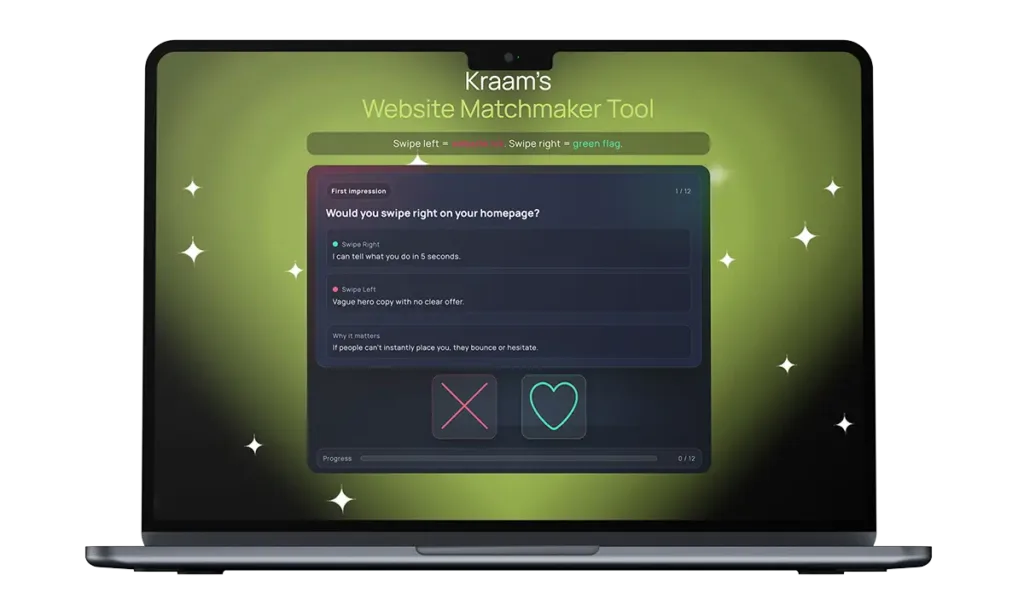
    Kraam's Website Matchmaker Tool

    Run a quick vibe check and see if your site’s turning heads.

    The most common and overlooked website “icks” – and how they cause real problems for businesses  

    Many of the biggest problems with websites aren’t dramatic or obvious – they’re small friction points that quietly frustrate users and push them away. Over time, these “icks” add up, affecting how long people stay on a site, how much they trust it, and whether they take action.  

    Some of the most common and overlooked issues include neglecting to build trust and legitimacy, preventing people from breathing while checking out a site and displaying information with disorganisation and a lack of clarity.  

    These problems can cause real problems for businesses, and here’s how:  

    Vague and shallow homepages 

    Users can click away from a site and its services if they can’t instantly place it – and a homepage containing hollow, empty language is a quick way to kill trust and attention.  

    Making a first impression is very important, and users will click off a site and find another one if they’re not instantly convinced to explore further.  

    Slow loading times 

    Pages that take too long to load test patience immediately and users are far less likely to engage with the content or delve into a company’s services if a site feels sluggish from the outset. 

    Studies show the average attention span is gradually reducing and if you’re struggling to reel someone in within a few minutes, it’s highly likely a prospective customer will bounce and take their business elsewhere.  

    Confusing or unclear navigation 

    Overloaded menus, vague labels or poorly structured pages make it difficult for users to find key information. When people can’t quickly locate what they need, they tend to leave. 

    It’s also worth noting that a website acts as a mirror for a business – so including mess and disorganisation can reflect negatively on a company and its services.  

    Poor mobile responsiveness 

    Websites that don’t adapt properly to smaller screens – with broken layouts, hard-to-read text or awkward buttons – risk alienating mobile users. 

    These days, many people opt to browse the internet on their phones rather than a laptop or tablet, so a website that fails to cater for most of its visitors will quickly become unpopular.  

    Cluttered layouts and intrusive elements 

    Too many pop-ups, banners or auto-playing videos can overwhelm visitors and distract them from the main message. 

    Stopping people from exploring a site with ease creates a stressful experience, rather than a positive one, prompting many to click away from a page which is too overloaded.  

    Unclear calls to action  

    If users don’t know what to do next, they’re unlikely to take any action at all. Websites that fail to highlight whether someone should get in touch, learn more or make a purchase risk losing prospective customers with this lack of direction.  

    Outdated or low-quality content  

    Old information, generic messaging or poorly written copy can make a business feel neglected or out of touch, even if its services are strong. 

    Neglecting to pay attention to the tone which is presented through the language displayed on a website can also quickly turn off visitors, especially if it comes across as detached and superficial. 

    Lack of trust signals 

    Missing reviews, unclear pricing, limited contact details or no evidence of real people behind the business can cause hesitation and suspicion. 

    Building trust with a new customer is pivotal, and feeding into scepticism by failing to include these markers of credibility can quickly tell people you have no legitimacy – and it’s unlikely users will return to a site where they feel the trust is broken.  

    How to rekindle the spark  

    So, what can you do about this? Luckily, we’ve got your back – and we’ve outlined a series of easy changes you can make to ensure your website delivers successfully every time.

    For your homepage, we suggest bringing it back to basics with one specific sentence. Inject clarity to ditch any uncertainty. We also advise having one, straightforward call to action, rather than multiple, to provide flow and direction to your online visitors.

    Zoom in on the language you’re putting across throughout the pages on your site and evaluate the tone it conveys. Replace any fluff with numbers and examples – and make sure you’re avoiding any disconnected, AI-style vocabulary where possible.  

    Next, turn your attention to your menu to encourage people to explore your site further. Adding clearer labels, and even a search bar if needed, is a quick and easy way to make your space more user-friendly.

    Ensure the pages of a site are simplified and easy-to-read. Remove any distractions, pop-ups, auto-playing elements and clutter to help visitors explore your site with ease and comfort.

    It’s also incredibly important to assess the legitimacy of your business by putting yourself in the shoes of your customer. Include real reviews and testimonials, as well as and clear contact details, to allow people to trust in both your site and your services. Putting together a simple ‘Meet the Team’ page also shows users the real faces behind the online space they’re exploring. A picture, a name and a job title for each of your team members is all you need – and it’s a proven way to gain trust authentically.

    Ready to kiss and make up?  

    With technological advancements taking place at rapid speed, it’s easy to feel as though your online platform is constantly going out of date. At Kraam, we know how you feel.

    To support businesses looking to make website adjustments, we’ve created an innovative Website Matchmaker Tool designed to help you decide if it’s time to part ways with your site – or if there’s a good foundation to rekindle the spark.

    Operating like a dating app, users can swipe left or right on a variety of elements that contribute to an online platform – where right is a green flag but left is an “ick”.

    Users are given a chemistry score out of 100 at the end to see how their site is fairing – and for those in trouble, we’ve highlighted a series of quick fixes so both you and your customers can fall back in love with your platform.

    Matthew Jeffers, Kraam’s website relationship guru, said:

    “If your website gives ‘it’s complicated’ vibes and your menu reads like a Chinese takeaway, with zero trust signals and stock-photo clone energy, it’s not quirky – it’s why leads are ghosting you.”

    “Our Website Matchmaker Tool will tell you whether to swipe right, swipe left or book your site in for some relationship counselling so we can bring the spark back.”

    To find out more about our services, please get in touch here.


  • What causes Black Friday server crashes

    What causes Black Friday server crashes

    What causes Black Friday server crashes — and what you can do to prevent them 

    Black Friday is one of the most demanding days of the year for online systems. Some say it’s a true stress test for any IT infrastructure.

    As millions of shoppers flood websites and AIs scrape the best deals, maintaining server performance becomes not just a technical challenge, but a critical business priority.  

    A momentary slowdown or unexpected crash can cost thousands in lost revenue, damage customer trust, and even impact long-term brand reputation. This year, one of North America’s largest retailers, Best Buy, suffered a website outage in the midst of Black Friday shopping season last year. 

    In this guide, we’ll share expert strategies to help your business maintain peak server performance for Black Friday

    What is server performance and why it matters more on Black Friday 

    Server performance refers to how effectively a server can handle and respond to requests. This includes the speed of processing workloads, the ability to manage multiple concurrent users, and the stability of system processes under varying levels of demand. 

    High-performing servers provide: 

    • Fast response times, ensuring users experience minimal delay when loading web pages or accessing applications. 
    • Strong reliability and uptime, reducing the risk of outages that interrupt service delivery. 
    • Scalable capacity, enabling organisations to grow without system slowdowns or errors. 

    The impact on user experience is drastic if you’re servers are slow and outdated. Older servers or ones that can’t support a business’s traffic, can cause page timeouts, sluggish applications, or interrupted online transactions. 

    This can lead to customer frustration, decreased engagement, and lost revenue. Internally, server issues may slow productivity tools, cause delays in data processing, and hinder operational efficiency. 

    Common causes of poor server performance on Black Friday 

    Server performance issues rarely appear without warning. 

    They typically stem from specific underlying causes. The most common include: 

    1. Insufficient resources 

    Servers require sufficient CPU, RAM, storage capacity, and network bandwidth. If any one of these becomes bottlenecked, such as a high CPU load or insufficient memory — performance will drop and server’s response time will increase. 

    Unplanned network traffic spikes caused by heightened traffic during Black Friday sales and AI bots and crawlers adding extra server pressure really highlight resource limitations. 

    2. Application-level inefficiencies 

    Even if hardware is up to the job, inefficient software can worsen your server’s performance.  

    Examples include: 

    • Unoptimised SQL queries 
    • Memory leaks 
    • Excessive logging 
    • Inefficient code loops 

    These inefficiencies cause disproportionate resource usage and slow the system over time. 

    3. Network congestion 

    High demand on network resources can limit data throughput and increase latency. This issue is especially common in distributed systems or environments that rely heavily on external APIs or remote storage. 

    4. Outdated hardware 

    Older servers may not keep up with modern workloads, even when well-maintained. Legacy hardware often lacks the processing power, storage speeds, or efficiency required for newer technologies, meaning websites can be even more susceptible to traffic spikes. 

    5. Misconfiguration issues 

    Incorrectly configured operating systems, network settings, or database parameters can cause network issues or prevent hardware from performing as expected. These issues may not present obvious symptoms at first, but over time they create noticeable performance strain. 

    Want to avoid these issues? 

    Reach out to our hosting and maintenance experts and never worry again. 

    Key server performance metrics to monitor 

    Monitoring your servers is paramount for performance management. The following metrics provide insight into how well your server is functioning: 

    CPU usage 

    Indicates the proportion of processing power being used. Sustained high usage suggests that workloads need optimisation or additional processing capacity. 

    RAM allocation 

    Measures memory utilisation. When free memory runs low, servers may begin swapping memory to disk, drastically reducing performance. Data read from memory is much faster than if that same data was read from disk. 

    Disk I/O 

    Represents how fast the server can read and write data. Slow I/O is a common bottleneck on servers running databases or large file operations — switching to NVMe SSD storage often provides immediate gains. 

    Network throughput 

    Reflects the volume of data being transmitted. Low throughput or high error rates can indicate congestion, misconfigured networking, or failing hardware. 

    Latency and response times 

    Measure how quickly the server responds to requests. High latency often directly impacts end-user experience and is critical to monitor in real time. 

    Optimising server resource usage 

    Optimisation improves efficiency and maintains performance without immediately increasing hardware cost. 

    Use resources smartly 

    If your system is running lots of AI tasks, it’s easy for one big job to slow everything else down.  

    Using tools like Docker or Kubernetes lets you set limits, so no single task eats all your memory or CPU power. When you can, run AI models on GPUs or move them to dedicated inference services — they’re designed for that type of work and can run much faster. It’s common practice to separate worker tasks from your production environment. 

    Make use of caching 

    Caching means saving the results of work you’ve already done, so you don’t repeat it unnecessarily. This is especially helpful for things like: 

    • API responses that are requested often 
    • AI model outputs that don’t change 
    • Embedding or similarity search results 

    Caching keeps your site feeling fast and reduces pressure on your servers and is one of the easiest ways to gain huge performance gains. 

    Balance the load 

    Instead of letting one machine handle all the traffic, spread requests across multiple servers. For AI-heavy applications, it’s often best to send inference requests to machines with GPUs, while letting regular backend tasks run on standard servers.

    This keeps everything running smoothly. For web traffic, load balancing can help distribute the requests across multiple servers to help avoid one server getting overloaded. 

    Cut out unnecessary processes 

    Sometimes the system is being slowed down by things you don’t even need.  

    Doing regular cleanups can help identify: 

    • Background tasks that aren’t in use anymore 
    • Data pipelines that are running constantly without real value 
    • Logging or monitoring tools that are collecting far more than necessary, such as MySQL slow query logging 

    Turning these down or turning them off frees up resources for the work that matters. 
     
    Looking to optimise your server performance?  

    Get in touch with us for tailored solutions.

    Maintenance best practices for long-term performance 

    To make sure that your servers are running at their best, and able to handle the annual Black Friday influx, there are few tips you can bear in mind that can help take the pressure off your systems. 

    Regular updates and patching 

    Keep OS, frameworks, libraries, database engines, and AI libraries updated to ensure you’re using the most efficient and secure versions. 

    Data cleanup and archiving 

    AI workloads generate large logs, checkpoints, embeddings, and analytics outputs. Implement: 

    • Automatic log rotation 
    • Tiered storage for cold data 
    • Policies to remove unused models and datasets 

    This keeps storage fast and responsive. 

    Scheduled stress testing 

    Simulate peak demand (including high concurrency AI-driven traffic) to verify: 

    • Load balancer readiness 
    • Auto-scaling response timing 
    • Cache effectiveness 

    This prevents performance surprises in production. 

    Backup and disaster recovery routines 

    Ensure backups include: 

    • Application data 
    • Configuration files 
    • AI model weights and embeddings 

    If an outage occurs, your replacement servers must support the same performance profile, including GPU if required. 

    When to upgrade or replace server infrastructure 

    Sometimes, no amount of infrastructure management can help you; your servers simply might not be able to keep pace with the demand. 

    To know for sure, you might want to keep an eye out for some of the signs that include: 

    • High CPU/RAM usage continues despite efforts to optimise your existing infrastructure. 
    • Your system suddenly feels slow when it’s processing AI requests or handling lots of database queries at once. 
    • If the server is saving or organising a lot of data quickly, the storage can struggle to keep up, which slows everything else down. 

    All of these factors may suggest the hardware simply cannot meet workload demand. 

    Cost vs. efficiency considerations 

    In some cases, holding on to older setups or trying to stretch existing hardware ends up costing more in the long run. For example, it’s important to consider that: 

    • Using GPUs instead of CPUs for AI tasks can actually lower costs, because they handle inference much more efficiently. 
    • Letting cloud servers scale automatically during busy periods can be cheaper than paying to keep large on-prem servers running all the time “just in case”. 
    • Specialised vector databases are often faster and more efficient for AI search and recommendation features than trying to force a traditional database to do the same job. 

    The key is to look at performance per pound, not just the price tag. A setup that costs a bit more upfront might deliver the same work for far less ongoing time, money, and hassle. 

    Strengthen your website with Kraam 

    With increased traffic heading to retail and ecommerce sites on Black Friday, you need to make sure your security, and servers are ready to handle the surge. 

    Kraam’s comprehensive website development services can help make sure that things run smoothly during the busy period.  

    Are you unsure that your IT infrastructure can handle the load? Kraam’s specialist hosting and maintain services can help you identify areas that need strengthening and work with you to bolster your website’s health. 

    Contact us today and speak to a specialist to find out how you can get started. 

  • Why brands outgrow off-the-shelf themes

    Why brands outgrow off-the-shelf themes

    Why brands outgrow off-the-shelf themes

    Off-the-shelf themes are like training wheels. They give you balance quickly, they let you move forward without much thought, and they make the early ride feel smooth. For start-ups and small businesses, that’s perfect: low cost, fast to launch, polished enough to look credible. But at enterprise scale, those same wheels stop being helpful. They become the thing slowing you down.

    This isn’t an argument against themes. They serve a purpose, and millions of sites wouldn’t exist without them. It’s about recognising the point where a tool that got you moving is now holding you back. That point often arrives sooner than brands expect.


    The performance ceiling

    Most commercial themes are built for the widest possible market. They ship with every layout, every style option, and every integration a buyer might want. That breadth is a selling point for the theme creator. But for the site owner, it translates to bloat.

    Extra JavaScript libraries, unused CSS, and poorly optimised images all pile up. You end up paying in milliseconds, and in the world of enterprise marketing, milliseconds are currency. When you’re driving tens of thousands of users through funnels each week, page speed is no longer just a technical metric—it’s conversion, trust, and revenue.

    A theme designed for “anyone” becomes a bottleneck for “everyone.”


    The plugin house of cards

    Themes rarely work alone. They lean heavily on plugins to add features—sliders, forms, SEO, e-commerce. At first this feels like flexibility. Later, it feels like dependency.

    • Plugins compete with each other for resources.
    • Updates break compatibility.
    • Security vulnerabilities multiply.

    In an enterprise environment, where marketing, IT, and legal all care about stability, this plugin sprawl creates risk. One broken dependency can knock out an entire sales funnel. One insecure extension can expose customer data. And while patching is possible, it often means firefighting at the worst possible time—during a campaign launch or a peak traffic spike.

    Custom builds replace the house of cards with deliberate integrations. Instead of stacking third-party solutions and hoping they play nicely, you build lean connections—API-driven, streamlined, and secured.


    Brand expression beyond the template

    Another quiet cost of themes is sameness. No matter how many colour options or layout tweaks a theme offers, it still carries a signature. Designers spot it instantly, and users sense it subconsciously. For a business trying to project authority, looking like “yet another WordPress site” undercuts the story.

    Brand expression at enterprise level demands more than surface decoration. It requires interaction patterns, typography systems, and content flows that are uniquely yours. A theme can mimic these, but only up to a point. Beyond that point, it starts fighting back. You spend more time hacking around limitations than creating something original.

    Custom development flips that. Instead of squeezing your brand into a pre-built mould, you build a system that fits how your brand actually moves.


    Growth outpaces templates

    The real breaking point usually isn’t day one. It’s year two, or three, when the business has grown beyond what the original site was built for.

    • New service lines need new content structures.
    • Marketing teams want campaign pages spun up in minutes, not weeks.
    • Global reach demands multilingual setups and localised landing pages.
    • Legal requires more granular compliance controls.

    Suddenly, the theme that felt like a shortcut becomes a blocker. Every change requires duct-taping more plugins, adding more weight, and introducing more points of failure. The cost of staying with the theme exceeds the cost of moving on.


    Migration as a Rite of Passage

    This is why so many enterprise teams go through what feels like a rite of passage: the migration away from off-the-shelf into a custom build. It’s not just about new visuals. It’s about re-architecting the site as a platform—something that can handle growth, integrate cleanly, and scale globally.

    The irony? Many businesses delay this shift out of fear of complexity. Yet the complexity is already there—it’s just hidden inside tangled themes and plugins. Migration is less about adding weight and more about stripping it away.


    The payoff of custom

    A custom WordPress build doesn’t mean reinventing the wheel. It means choosing which wheels matter for your vehicle.

    • Performance: pages load faster because there’s no excess baggage.
    • Security: the surface area for attack is reduced.
    • Flexibility: marketing teams gain tools designed around their actual workflows, not generic ones.
    • Longevity: the site becomes an asset that can adapt with strategy, not against it.

    The difference is subtle on the surface. To a casual visitor, both a theme site and a custom build may look polished. But in how they behave under pressure, in how fast they respond to change, in how confidently they carry brand weight—the gap is enormous.


    Knowing when it’s time

    So how do you know when you’ve outgrown your theme? A few signals appear again and again:

    • Page speed metrics flatten no matter how much you optimise.
    • Your content team is frustrated by rigid templates.
    • Security patches feel like a constant scramble.
    • The brand feels cramped inside the design.
    • Expansion ideas are met with “the theme can’t handle that.”

    When those signals start stacking up, it’s not just a technical issue. It’s a strategic one. The site has stopped being an enabler and has become a drag.


    Beyond training wheels

    Themes aren’t failures. They’re stepping stones. They’re how businesses learn, experiment, and prove ideas quickly. But like training wheels, they’re not meant for the whole ride.

    At enterprise scale, the risks are bigger, the stakes higher, and the opportunities wider. Staying strapped into a mass-market template is like trying to win a race on a bike built for children. You can pedal hard, but you won’t get far.

    The brands that thrive are the ones that know when to let go of the shortcut and invest in the foundation. That’s where custom WordPress stops being just “a CMS choice” and becomes the engine for performance, growth, and differentiation.

    kraam is Hampshire’s leading website design and branding agency – if you have outgrown your current WordPress theme reach out to our in-house experts and revive your brand.

  • The anatomy of a successful website migration

    The anatomy of a successful website migration

    The anatomy of a successful website migration

    Transferring an enterprise website to WordPress is, in some cases, called a “lift and shift”. In fact, it’s the opposite. Changing platforms isn’t like moving furniture from one home to another residence. It’s more akin to redeveloping the house while residents continue to live in it, losing none of their impact while making it stronger and more modern along the way.

    Most organisations minimise that complexity. They believe the hardest part is copying content over. The truth is, content is just one thread in a far larger weave. The architecture of a successful migration involves strategy, precision, and choreography through technology, people, and process.


    Start with why

    The first mistake businesses make is migrating without an understanding of why. “We need WordPress” is not a valid reason. The platform itself is sterile; it only becomes powerful when it’s being used for a specific purpose.

    • Is the aim faster publishing workflows?
    • Lower licensing and maintenance costs?
    • Better marketing system integrations?
    • Better performance and SEO?

    Without a north star, projects drift. Teams become mired in technical details and lose their focus on the business issue migration is supposed to solve. A successful migration starts with determining the strategic “why”.


    Audit before you move

    Once the why is clear, the next step is an audit. This is where the migration is won or lost.

    • Content inventory: what you have, what’s still valuable, and what needs to be retired.
    • URL mapping: which structures need to be preserved for SEO continuity.
    • Plugin and integration review: identifying dependencies that might not translate directly.
    • Performance benchmarking: understanding the current state so improvements can be measured.

    Skipping this stage is like moving house without packing boxes. Things get lost, broken, or duplicated. An audit creates order from chaos before any code is written.

    Building for tomorrow, not yesterday

    Most migrations fail because they copy the old system too effectively. The urge is to create “the same site, but on WordPress”. That misses the point. Migration is the perfect chance to prepare for the future.

    It means refactoring content types for scalability, creating modular design systems instead of static templates, and baking in SEO and accessibility best practices from day one. Enterprises need to treat migration as a re-architecture, not a rebuild, and design the platform the brand will need in two, three, five years’ time.

    Risk management at cutover

    Even the cleanest migration brings risk on go-live day. Redirect chains are susceptible to breaking, analytics can be set back, and forms stop firing. The cutover needs to be handled as a live show.

    Important considerations are:

    • Comprehensive redirects: ensuring all previous URLs direct users (and search engines) to its new home.
    • Double analytics tracking: old and new setups running concurrently during testing.
    • Content freeze windows: preventing last-minute changes that would create mismatches.
    • Rollback plans: a simple means of going back in the event of severe issues.

    Done properly, users won’t even notice they’re switching. To them, the brand simply feels tighter, faster, brighter.

    The human element

    Migration isn’t just technology. It’s cultural. Employees who have worked together in a single CMS for several years bring habits and expectations with them. Without training, they can feel lost in the new configuration.

    Training sessions, documentation, and open feedback loops are a must. When content and marketing teams are empowered, not sidelined, adoption happens quicker. When they’re not, the shiny new platform is quickly a frustration.

    Successful migration takes human onboarding as seriously as technical onboarding.

    What failure looks like

    • Sites that lost half their organic traffic overnight because redirects hadn’t been mapped correctly.
    • Teams frozen for weeks because they had no idea how to work with the new CMS.
    • Brands handicapped by technical debt since they introduced pre-existing plugin bloat into the new build.
    • Every failure has one underlying theme: not enough preparation and not enough orchestration.

    Success is quiet

    There are so many tales of migrations that have gone wrong:

    By contrast, the greatest migrations are unobtrusive. They don’t hit the headlines. Users don’t complain about them. Stakeholders don’t lose sleep over them. The site just keeps on running, only more so. Pages load faster, content updates arrive more seamlessly, and campaigns launch sooner.

    That quietness is success. Migration is not drama; it’s business as usual. Smooth continuity from one platform to the next where the only apparent change is improvement.

    The enterprise advantage

    Managed well, migration isn’t merely risk mitigated – it’s a chance. Businesses can lower total cost of ownership, become more flexible, and unlock integrations that were previously not feasible. They transition from brittle patchworks to future-proofed systems.

    That result doesn’t occur by happenstance, though. It results from addressing migration as strategy rather than mechanics. Audit profoundly, design ahead of time, orchestrate cutover, and take care of the humans who will be operating the system daily.

    That’s the anatomy of a migration done immaculately. Not a lift and shift, but a transformation in disguise as a transition.

  • Security and scalability in high-stakes WordPress builds

    Security and scalability in high-stakes WordPress builds

    Security and scalability in high-stakes WordPress builds

    For enterprise websites, the stakes aren’t abstract. They’re measured in customer trust, campaign revenue, and regulatory risk. A brochure site that goes down is inconvenient. An enterprise site that fails under load or leaks data is catastrophic.

    That’s why security and scalability aren’t extras to bolt on at the end of a WordPress project. They’re the foundation. Yet too many enterprise builds still treat them as afterthoughts, leading to expensive firefights later. Done right, security and scalability don’t slow creativity – they unlock it.


    Security as architecture, not patchwork

    The WordPress ecosystem is vast. Tens of thousands of plugins promise to solve almost any problem, from SEO to payments. But every plugin is also a potential door. When stacked together, they form a patchwork of code written by different developers with different priorities.

    In small sites, that risk is tolerable. For enterprises, it isn’t. The cost of a breach is measured not just in downtime, but in reputation, compliance fines, and legal exposure. Security has to be baked into the build itself:

    • Minimal attack surface: lean, audited code instead of “plugin soup.”
    • Principle of least privilege: user roles tightly controlled so marketing, content, and IT teams only have access to what they need.
    • Routine penetration testing: simulated attacks to surface vulnerabilities before bad actors do.

    This shifts security from reactive to proactive. The strongest builds don’t rely on firewalls and monitoring alone — they reduce the number of cracks in the wall in the first place.


    Scalability: Preparing for surges, not averages

    Most websites are built for average traffic. But enterprise traffic isn’t average. A product launch, a press mention, or a paid campaign can push visitor numbers from thousands to millions in hours. If the architecture isn’t ready, the site buckles at the very moment it needs to perform.

    True scalability means:

    • Load balancing across servers so demand is spread evenly.
    • Caching layers that serve content fast without hammering the database.
    • Content Delivery Networks (CDNs) that put pages closer to global users.
    • Database optimisation so queries don’t become bottlenecks at scale.

    These aren’t nice-to-haves. They’re what keep an enterprise site standing when it’s under the heaviest pressure.


    The link between security and scalability

    Security and scalability aren’t separate goals. They reinforce each other. A bloated site with endless plugins is harder to secure and harder to scale. A lean, efficient build is easier to defend and easier to grow.

    Both disciplines also rely on discipline in process: version control, automated testing, continuous deployment. Enterprises that treat their site as living infrastructure — updated, monitored, and evolved — avoid the brittle fragility that comes from “set and forget.”


    When security and scalability empower creativity

    The irony is that the safest, most scalable sites often feel the most flexible to use. When a marketing team knows the foundation is sound, they can launch campaigns without fear of breaking the system. When leadership knows the site can take a hit of traffic without collapsing, they can invest in bold advertising pushes.

    Security and scalability are often seen as constraints. In reality, they’re enablers. They free teams from worrying about fragility and let them focus on growth.


    What failing looks like

    Plenty of enterprises learn this the hard way. Pages that crawl to a halt under campaign load. Login breaches that expose customer data. Compliance audits that flag sloppy role management. Every one of these failures is preventable. And every one of them erodes trust.

    Customers rarely forgive a second breach. Teams rarely recover enthusiasm for a platform that keeps crashing under their work. The damage runs deeper than downtime.


    The future stakes

    As WordPress continues to power a significant share of the enterprise web, attackers will keep innovating. Botnets, DDoS campaigns, and automated exploits will get faster. At the same time, user expectations will keep tightening — “slow” already means anything over two seconds.

    The question isn’t whether your site can cope today. It’s whether it can cope tomorrow, when demand spikes harder and threats grow smarter.


    In the end

    Security and scalability are the twin pillars of enterprise WordPress. Neglect either and the site may look polished but it’s brittle underneath. Prioritise both and the site becomes something more: a platform teams can trust, customers can rely on, and leadership can build strategy around.

    That’s the real payoff. Not a site that just survives, but a site strong enough to support growth without hesitation.

  • How to design for enterprise speed without breaking UX

    How to design for enterprise speed without breaking UX


    How to design for enterprise speed without breaking UX

    Enterprise websites sit in an awkward tension. They’re expected to carry massive traffic, multiple integrations, and sprawling content structures – yet still feel as immediate and intuitive as the sharpest consumer apps. The instinct is often to chase visuals and functionality first, leaving performance to be fixed later. That’s backwards. In the enterprise world, speed isn’t a nice-to-have – it’s part of the experience.


    Speed is UX

    When a site hesitates, users feel it as distrust. A couple of seconds waiting for a page to load can be the difference between a decision made and a lead lost. Enterprise users, in particular, aren’t just browsing; they’re on a mission. The site’s response time is as much a part of the brand promise as its design language.

    Building with constraints in mind

    The smartest way to protect speed is to design within limits from the very start. Performance budgets work like architectural blueprints – they define how much weight the structure can carry before it fails. Setting thresholds for things like load times, font usage, and media weight keeps ambition grounded in reality.

    • Time to First Byte (TTFB) under 0.3s
    • Largest Contentful Paint (LCP) under 2.5s
    • Strict limits on web font families and third-party scripts

    These aren’t abstract numbers; they’re the guardrails that keep a polished design from collapsing under its own weight.

    Clarity over clutter

    Another principle is to focus the opening view. The first screen should hold the essentials: a headline that anchors the message, a clear call-to-action, and a single supporting image or video. Everything else can load progressively. Skeleton screens and subtle placeholders are useful here, buying the user confidence that the site is alive and responsive.

    Systems beat one-offs

    Speed is also a by-product of discipline. Designing a component system – where each element is optimised once and reused everywhere – prevents the creep of CSS and JavaScript bloat. It also locks in consistency, so a brand can scale without every new page becoming a performance gamble.

    Collaboration, not compromise

    Performance is often cast as a battle between design and development: pixels versus page weight. That’s a false dichotomy. Many of the biggest wins come from collaboration as we do at Kraam – choosing SVGs instead of heavy PNGs, or letting CSS handle motion instead of JavaScript. These choices protect both the aesthetic and the load time.

    Test like it’s real

    Enterprise websites usually perform beautifully on a staging server and then struggle in the wild. Testing has to reflect reality: throttled bandwidth, global CDNs, real devices. What matters isn’t just raw page speed, but how quickly a user can actually interact with the site. Accessibility checks belong here too. Speed is useless if key audiences can’t navigate.

    Think beyond borders

    For global enterprises, there’s also the matter of geography. What loads instantly on a London fibre connection might crawl on a mobile device in Southeast Asia. Edge caching, localisation, and mobile-first layouts aren’t just technical fixes; they’re strategies to make a brand genuinely accessible worldwide.

    In conclusion

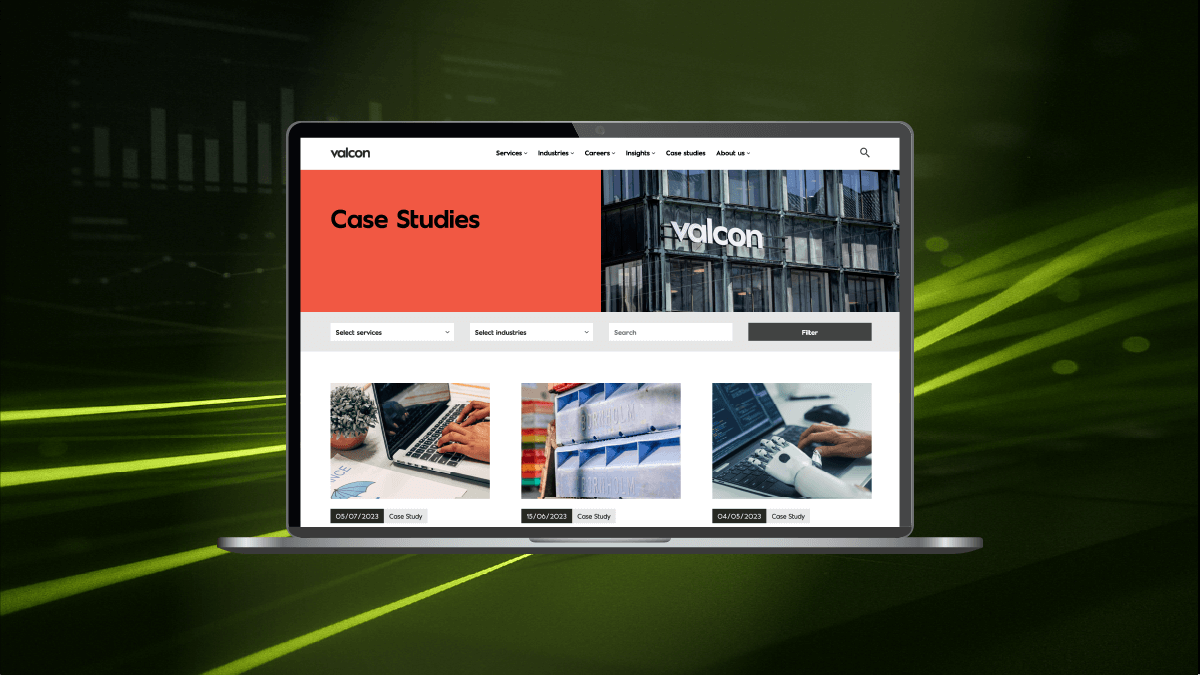
    Designing for speed isn’t about restraint. It’s about alignment – where technical excellence and user experience pull in the same direction. When a site is both fast and intuitive, like Valcon, the brand feels confident, the message lands cleanly, and users don’t notice the infrastructure at all. They just get where they need to go. And that’s the whole point.

  • New block interactions in WP 6.8

    New block interactions in WP 6.8

    New block interactions in WordPress 6.8

    WordPress continues to evolve from a simple blogging tool into a fully-fledged website design and development platform. With each new release, the block editor (Gutenberg) gains features that move it closer to a complete design system. WordPress 6.8 introduces a host of new block interactions that reshape how creators build, manage, and enhance their websites. These changes reduce reliance on custom code, improve usability, and open doors for richer, more dynamic site experiences.

    In this article, we’ll explore the major updates to block interactions in WordPress 6.8, why they matter, and how you can make the most of them in your workflow.


    What are block interactions?

    Block interactions refer to the ways users can manipulate and customise blocks – the fundamental building elements of modern WordPress. From text and images to forms and dynamic layouts, every element on a page is a block. Interactions determine how you move, configure, animate, or integrate these blocks with others.

    In earlier versions of WordPress, block editing was powerful but sometimes clunky. Common tasks like rearranging layouts or styling specific elements required external CSS or plugins. With WordPress 6.8, these pain points are being addressed, making block editing more seamless and intuitive.


    Key features of block interactions in WP 6.8

    1. Advanced drag-and-drop

    The drag-and-drop interface has been completely overhauled. Instead of awkwardly shifting blocks, users can now snap elements into grid-based layouts or nest blocks fluidly within containers. This makes it easier to create magazine-style pages, complex portfolios, or responsive layouts without struggling with alignment.

    Why it matters: Non-technical users gain confidence when layouts behave predictably. Developers spend less time fixing broken structures.

    What our Design team say:

    “As a designer, I see WordPress 6.8 as a big step forward in reducing the gap between vision and execution. Before, I’d hand over static mockups and cross my fingers that the build matched my intent. Now, with contextual editing and block-level animations, I can shape the experience directly. It’s closer to designing in Figma, but the output is a live website. My only concern is that with more tools in the hands of non-designers, consistency might slip – but with proper design systems in place, this release is a win for creativity and speed.”


    2. Contextual settings panels

    Previously, editing a block’s properties often meant navigating sidebars or menus. In WordPress 6.8, contextual settings appear right where you’re working. Hovering over a block reveals inline controls for margins, typography, colours, and more.

    Benefit: This reduces friction in the editing process, cutting down the time between design ideas and execution. It feels closer to professional design tools like Figma or Sketch, but with the power of a live website.


    3. Block-level animations

    For the first time, WordPress introduces native animation options for blocks. Users can apply fades, slides, and subtle motion effects directly from the editor. Previously, this required third-party plugins or JavaScript knowledge.

    Example use cases:

    • Fade-in text for blog intros.
    • Sliding image galleries for portfolios.
    • Animated call-to-action buttons to boost conversions.

    SEO note: Google increasingly values user experience signals, including interactivity. Smooth animations can improve engagement metrics like time-on-page.


    4. Enhanced nesting and grouping

    Complex designs often require blocks within blocks. WordPress 6.8 makes this process smoother with enhanced nesting support. For example, you can now create a multi-column layout inside a card, within a grid – without breaking the design.

    This mirrors how developers structure HTML containers but translates it into a visual, no-code environment.


    5. Developer APIs for custom interactions

    For advanced users, new APIs allow developers to define custom block interactions. This means plugin and theme developers can build blocks with specialised behaviours that match brand or business needs.

    Examples:

    • A custom product showcase block for eCommerce sites.
    • Interactive data visualisations for reports.
    • Drag-to-compare image sliders for case studies.

    What our Dev team say:

    “From a developer’s perspective, these updates are a mixed bag – in a good way. On one hand, the new APIs for custom interactions are great because they let us extend WordPress without hacking things together. On the other, the more that gets baked into core, the more I need to keep an eye on performance and plugin compatibility. I like that clients can now handle simple layout tweaks without pinging me for every change, but I also know I’ll be the one troubleshooting when someone adds twenty animated blocks on a page. Overall, though, it’s progress.”


    Why these updates matter

    Democratising web design

    WordPress has always aimed to democratise publishing. With these updates, it now democratises design. Non-coders can craft sophisticated experiences without outsourcing everything to a developer.

    Faster prototyping

    Design teams can use WordPress itself as a prototyping tool, reducing the need for constant back-and-forth between design and development teams. What you design is what you publish.

    Consistency across devices

    Improved responsiveness and nested structures mean fewer design breakages across desktop, tablet, and mobile.


    How to use block interactions in your workflow

    Step 1: Explore the new editor

    Take time to experiment in a staging environment. Familiarise yourself with the updated controls, especially inline settings and animations.

    Step 2: Redesign a key page

    Choose a high-traffic page (like your homepage or a product landing page) and rework it using the new features. Track engagement changes in analytics.

    Step 3: Train your team

    If you work in an agency or organisation, run a short training session. Show non-technical team members how they can update layouts without developer input.

    Step 4: Extend with plugins

    Check if your favourite plugins have been updated to leverage the new APIs. Many will offer extended animation or interaction libraries.


    Potential challenges

    Learning curve

    Although easier overall, the sheer number of options may overwhelm beginners. Clear tutorials and templates will help.

    Compatibility issues

    Older themes or plugins may not support advanced nesting or animations. Test thoroughly before pushing changes live.

    Performance Considerations

    Animations and complex layouts can affect site speed if overused. Balance aesthetics with performance.


    The future of WordPress design

    WordPress 6.8 isn’t just another incremental update. It signals a shift towards WordPress becoming a true design platform. Over the next few years, we can expect even tighter integration with design tools, AI-assisted layout suggestions, and more interactive features built directly into the editor.

    For designers and developers, this means fewer silos. For businesses, it means faster, more cost-effective site management.


    Conclusion

    The new block interactions in WordPress 6.8 make site building more intuitive, flexible, and powerful. Whether you’re a solo blogger, a creative agency, or a large enterprise, these features can streamline workflows and open up fresh design possibilities.

    Now is the time to explore, experiment, and embrace these changes — because WordPress is no longer just about publishing content; it’s about designing experiences.