






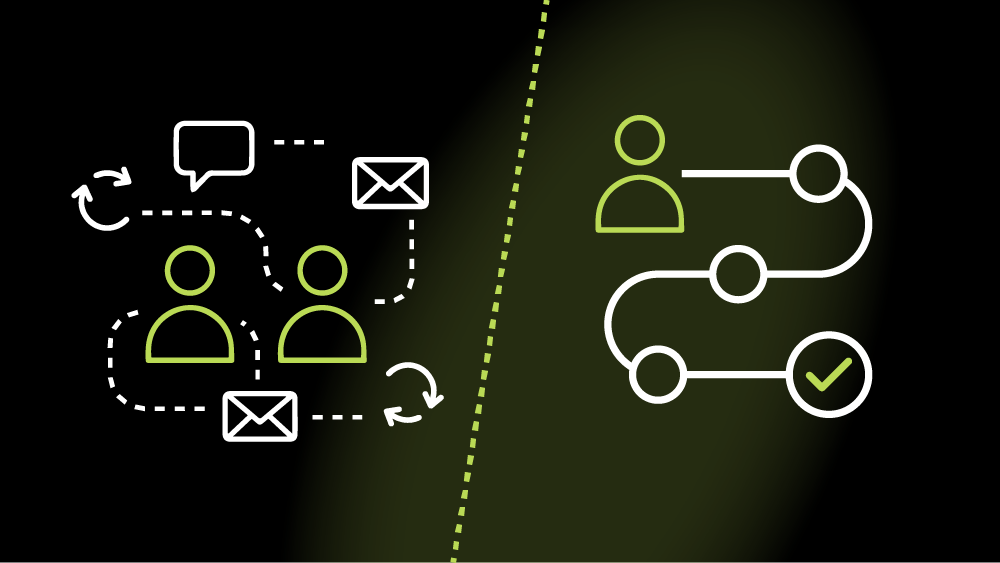
Understanding how people interact with your website is essential but understanding how they interact with your brand is what really drives growth.
That’s where the distinction between the user journey and the customer journey becomes critical.
These terms are often used interchangeably, but they’re two very different concepts in practice. When businesses confuse them, websites may look good and function well, yet still fail to convert, retain, or build long-term value.
This guide explains the key differences between the user journey vs customer journey, why both matter, and how aligning them leads to better websites and stronger business outcomes.
What is a Customer Journey?
The customer journey describes the complete end-to-end experience a person has with your brand, across all channels and touchpoints, both digital and offline.
It starts long before someone lands on your website and continues long after a conversion takes place.
Key characteristics of a customer journey
- Covers the entire lifecycle of a relationship with your brand
- Includes marketing, sales, product usage, support, and retention
- Spans multiple platforms and interactions (ads, search, website, email, social, customer service, etc.)
- Focuses on perception, trust, loyalty, and long-term value
Typical customer journey stages
While models can vary, most customer journeys include stages like:
- Awareness – discovering your brand or problem
- Consideration – comparing options and researching solutions
- Decision – converting, purchasing, or enquiring
- Retention – continued usage and engagement
- Advocacy – recommending or promoting your brand
Your website usually plays a role in multiple stages, not just the point of conversion.
What Is a User Journey?
A user journey focuses on how someone interacts with a specific digital experience, usually your website or application.
Rather than the full brand relationship, it looks at how users’ complete tasks, move through interfaces, and achieve goals within a defined environment.
Think of it like the action part of the customer journey where users are actually engaging with your website, features and products.
Key characteristics of a user journey
- Narrower and more focused than the customer journey
- Typically limited to on-site or in-app behaviour and usability
- Task-driven (like “request a quote”, “find pricing”, “complete checkout”)
- Closely linked to UX, UI, and interaction design
Examples of user journeys
- Landing on a homepage → navigating to services → submitting a contact form
- Visiting a blog post → clicking a CTA → downloading a resource
- Browsing products → filtering results → completing checkout
User journeys are concerned with usability, clarity, and friction, rather than the broader emotional or brand relationship.
User Journey vs Customer Journey: What’s the Difference?
Although they’re closely related, the user journey vs customer journey differ in scope, purpose, and measurement.
| Aspect | Customer Journey | User Journey |
| Scope | Holistic and long-term, covering the full relationship with a brand | Specific, focused, and short-term |
| Focus | Brand perception, trust, and overall lifecycle value | Task completion and interface usability |
| Interactions | Online and offline interactions (ads, emails, website visits, sales calls, support) | Primarily digital interactions (website or app) |
| Ownership | Marketing, sales, customer success, and leadership teams | UX designers, developers, and product teams |
| Primary Question | Why someone is interacting with your brand | How someone interacts with your website |
Put simply, the customer journey explains why someone is interacting with your brand. The user journey explains how they interact with your website.
How User Journeys and Customer Journeys Work Together
The most effective websites don’t optimise for one journey in isolation.
A seamless user journey supports the broader customer journey — and a well-understood customer journey provides the context that makes user journeys meaningful.
For example:
- A frictionless contact form improves the user journey
- Clear messaging aligned to buyer intent improves the customer journey
- Together, they increase conversion quality and long-term satisfaction
When businesses only focus on UX without understanding customer context, websites may be easy to use but poorly aligned with real motivations.
What Is Journey Mapping?
Journey mapping is the process of visualising how people experience your brand or website over time.
Customer journey mapping
A customer journey map outlines:
- Touchpoints across channels
- Emotions, motivations, and pain points
- Gaps or inconsistencies in the brand experience
It helps teams understand where prospects drop off, lose trust, or disengage.
User journey mapping
A user journey map focuses on:
- Entry points to the website
- User actions and decision points
- Barriers, friction, or confusion
- Opportunities to improve flow and clarity
This is particularly useful during website redesigns or UX optimisation projects.
How to Optimise the Customer Journey Through Your Website
Your website should support multiple stages of the customer journey, not just the final conversion moment.
Many websites are built entirely around “getting the lead” but fail to address what users need before and after that point. Optimising the customer journey means designing your site to guide people from first awareness through to long-term engagement.
Tailor messaging to different levels of awareness
Not every visitor is ready to convert. Some are discovering a problem for the first time, while others are actively comparing providers.
Your website should:
- Introduce problems and opportunities clearly for early-stage visitors
- Provide deeper, more specific information for those in the consideration stage
- Reinforce confidence and clarity for decision-ready users
This often means using layered content across landing pages, blogs, case studies, and FAQs rather than forcing everyone down the same path.
Answer questions at the consideration stage
At the consideration stage, users are actively evaluating options. If your website doesn’t answer their questions, they’ll likely leave to find answers elsewhere.
Effective websites:
- Anticipate common objections and uncertainties
- Explain processes, pricing structures, and outcomes clearly
- Use comparisons, examples, and proof points where appropriate
This content builds trust and reduces the cognitive load required to move forward.
Use trust signals to reduce decision friction
Trust is one of the biggest blockers in the customer journey, especially for high-value or service-based purchases.
Your website can reduce friction by including:
- Testimonials and case studies
- Client logos or recognisable brands
- Clear contact details and transparency
- Professional design/branding and consistent messaging
These signals reassure users that progressing is a safe and sensible decision.
Use data to identify journey gaps
Analytics, CRM data, and user feedback are essential for understanding where the website is failing to support the wider journey.
Drop-offs, repeated questions, and stalled leads often indicate:
- Missing information
- Poor alignment between marketing and UX
- Mismatched expectations
Optimisation starts with understanding why people disengage, not just where.
How to Optimise User Journeys on Your Website
Optimising user journeys is about making it easy and intuitive for people to complete tasks without confusion or friction.
While customer journey optimisation is strategic and holistic, user journey optimisation is more tactical and UX-focused.
Create clear navigation and information architecture
Users should never have to guess where to go next.
Effective information architecture:
- Groups content logically
- Uses clear, descriptive labels
- Reflects how users think, not internal company structure
When navigation mirrors user intent, journeys become shorter and more confident.
Design intuitive layouts and visual hierarchy
Page layouts should guide attention naturally, not compete for it.
Strong user journeys rely on:
- Clear headings and spacing
- Visual cues that highlight priority actions
- Consistent patterns across the site
This reduces cognitive effort and helps users progress without hesitation.
Test assumptions with real behaviour
Internal assumptions about how users “should” behave are often wrong.
User journey optimisation depends on:
- Observing real behaviour
- Identifying unexpected patterns
- Iterating based on evidence, not opinion
Small changes informed by real data often outperform major redesigns based on guesswork.
Use the right tools to uncover friction
Tools like:
- Heatmaps
- Session recordings
- Usability testing
- Conversion tracking
help uncover where users hesitate, struggle, or abandon tasks — and why.
These insights turn UX improvements from subjective debates into measurable improvements.
Common Mistakes Businesses Make
Many underperforming websites don’t fail because of poor execution, but because of flawed thinking.
Some of the most common mistakes include:
Treating user journey and customer journey as the same thing
When these concepts are conflated, websites become either:
- Overly tactical, ignoring broader context
- Or overly strategic, ignoring usability
Both journeys need to be understood and optimised together.
Optimising pages in isolation
Improving individual pages without considering the wider journey often creates disconnected experiences.
Users don’t experience websites page by page — they experience them as flows.
Prioritising aesthetics over usability
Visual design matters, but not at the expense of clarity.
Websites that look impressive but feel confusing often:
- Increase bounce rates
- Reduce conversion confidence
- Create unnecessary friction
Good design supports usability, not the other way around.
Designing for internal assumptions instead of real users
Internal teams are rarely representative of real users.
When websites are built around internal language, priorities, and workflows, they often fail to align with how users actually think and behave.
Optimise Your Website with Kraam
Don’t lose customers or put users off because of poor experiences — the best companies strengthen both.
Kraam’s comprehensive website development services makes sure that things are optimised from the moment a potential customer becomes a user.
Contact us today and speak to a specialist to find out how you can get started.